№ 007/The manual, kept short
How to use Inbill.
Everything below takes minutes, not evenings: your first invoice, the voice assistant, recurring schedules, sending and getting paid, who owes you, and templates.
Last updated
01 · Getting started
Send your first invoice in under three minutes
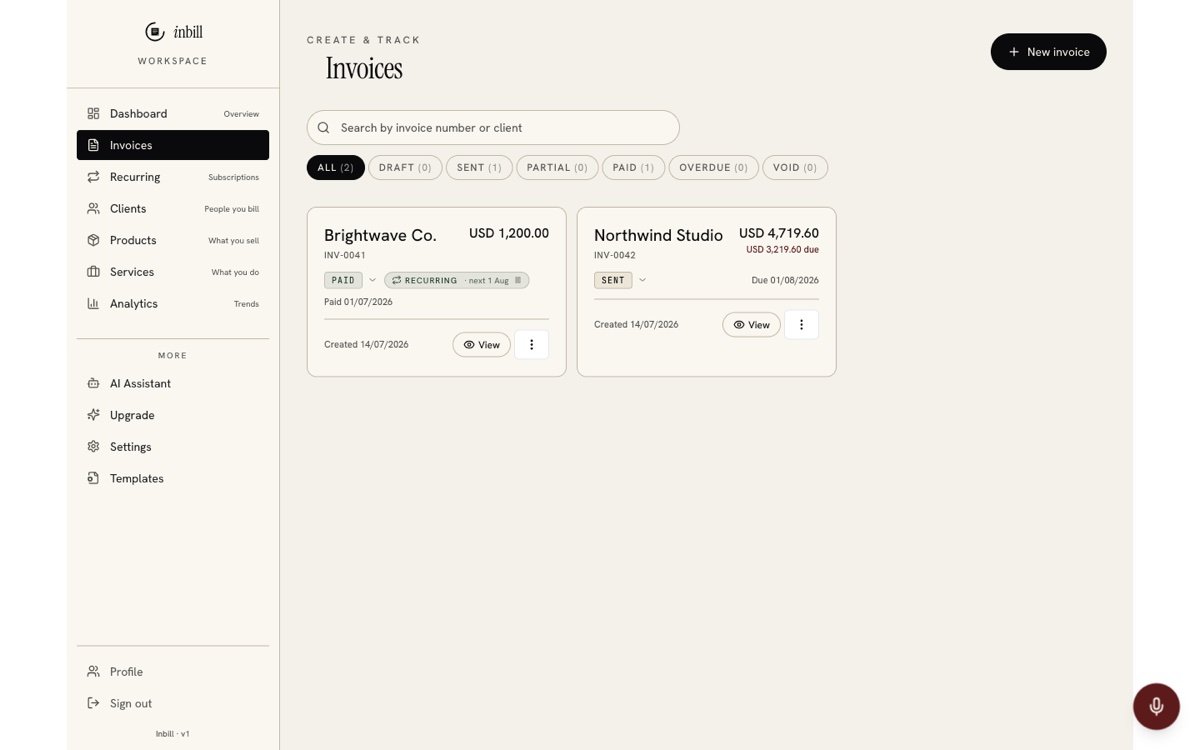
Sign in free at inbill.net (no card), fill your company details once, add a client, and hit "New invoice". Add line items, pick a currency and template, save — then download the PDF, email it, or share the public link. The free plan includes 10 invoices every month, forever.
- 01
Sign in
Open inbill.net and sign in with email or Google. The setup wizard opens on first run.
- 02
Set company info once
Business name, logo, address, tax ID, and payment details (Wise, Payoneer, bank, or custom). These print on every invoice automatically.
- 03
Add a client
Name and email are enough to start. Or paste an email signature into the AI assistant — it extracts the fields for you.
- 04
Create the invoice
Pick the client, add line items with quantity and rate, set per-line tax if you need it, choose any of 47 currencies, pick a template.
- 05
Send it
Tap Send: WhatsApp opens with the amount and invoice link already typed, or send by email, copy the link, or download the PDF. Your client opens the link in any browser — no account needed.
02 · Voice AI assistant
Talk to your books — in your language
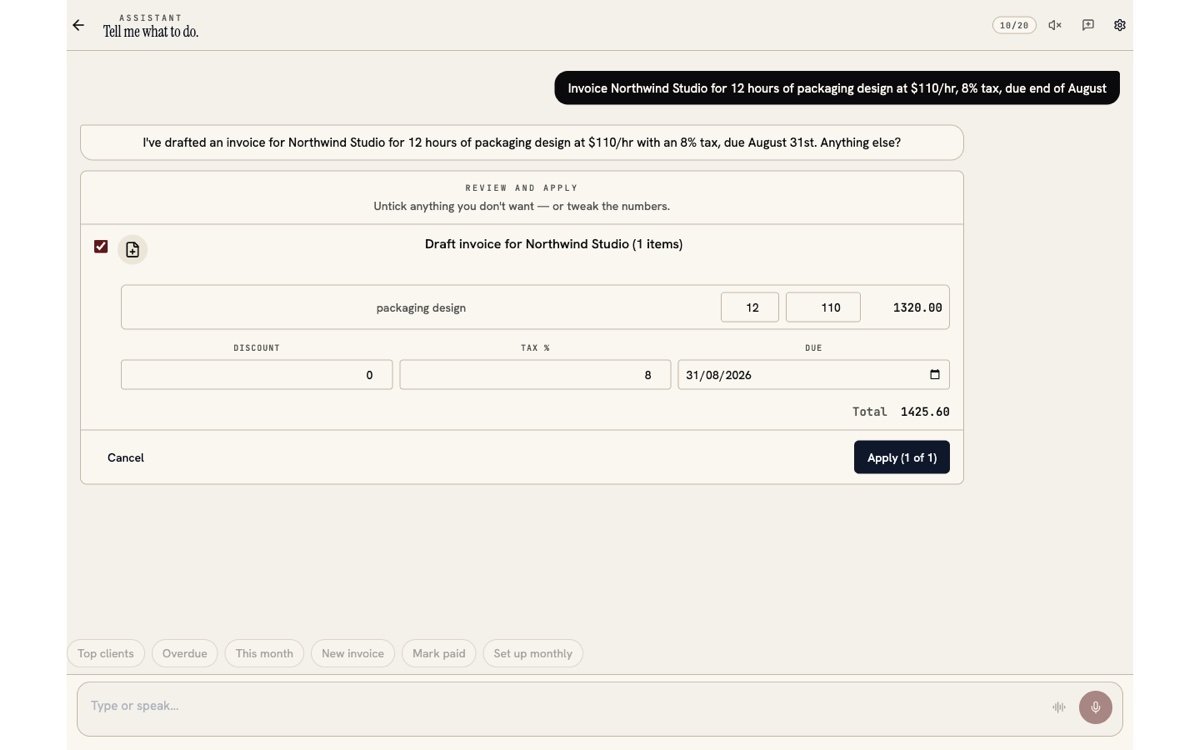
Tap the mic button (bottom-right on every screen) or open AI Assistant from the menu. Speak in English, Urdu, Hindi, or Arabic: "invoice Northwind for 40 hours of branding at $95/hr". The assistant drafts it and shows a review card — nothing saves until you tap Apply.
Sending and deleting are extra-guarded: those actions run a 5-second cancellable countdown after you approve them.
- 01
Open the assistant
The round mic button floats on every signed-in screen. On the Dashboard there is also a "Tap and speak" bar.
- 02
Speak or type
Voice works on web (Chrome/Safari) and Android. The live transcript appears above the input while you talk — you can edit it before sending.
- 03
Review the draft card
Create/update actions appear as cards with per-row checkboxes. Edit the important fields inline, untick what you don't want, then hit Apply.
- 04
Ask about your numbers
"Who owes me money?", "revenue this month?", "top client this year?" — answers come from your data only, right in the chat.
- 05
Know the limits
Free plan: 20 AI turns/day. Pro: 200/day. The fuel gauge in the chat header shows what's left.
03 · Recurring invoices
Put retainers on autopilot
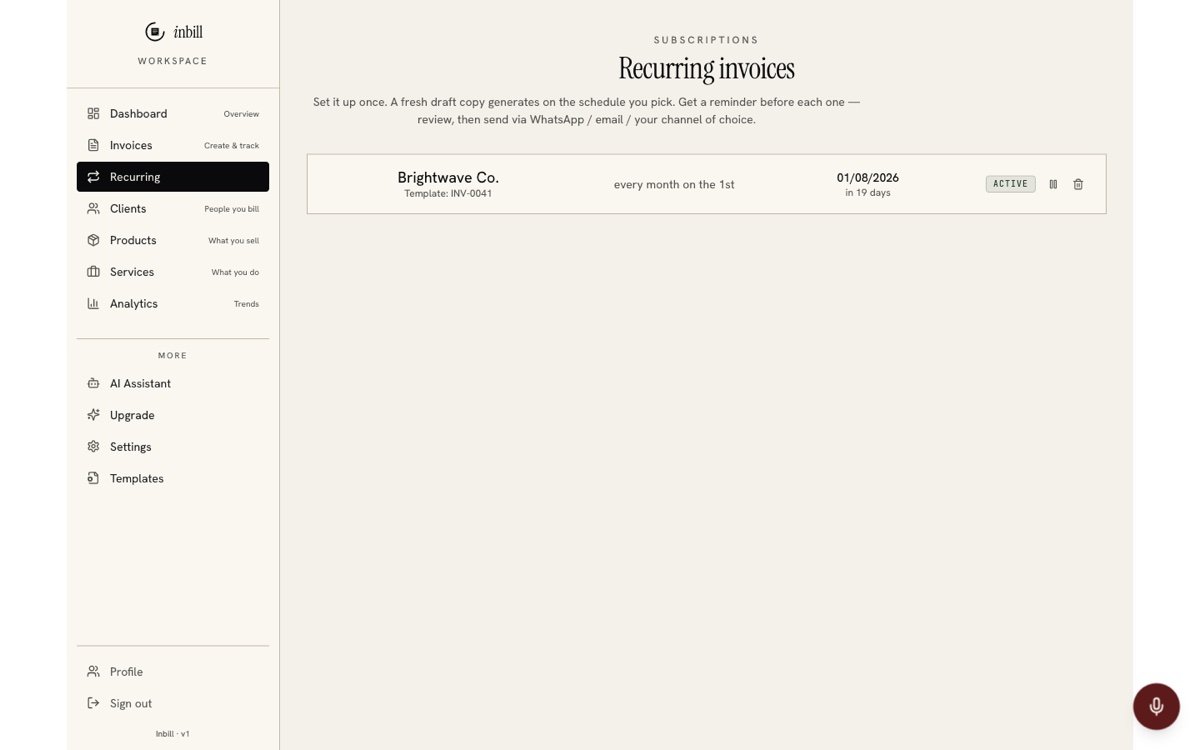
Open Recurring in the sidebar, pick an existing invoice as the template, choose the rhythm (weekly, monthly, or custom), and optionally enable auto-send. Inbill generates the next invoice on schedule with a fresh number and public link, and can email it to your client the moment it exists.
Recurring invoices work on every plan: on Free each generated invoice counts toward your 10 a month, and Pro makes them unlimited.
- 01
Create the template invoice
Any invoice can be the template. Its line items, currency, tax, and template look are cloned each cycle.
- 02
Pick the rhythm
Weekly, monthly, or a custom rule. The next-run date shows before you save.
- 03
Choose auto-send
On: the generated invoice emails itself to the client. Off: it lands as a draft for your review.
- 04
Set an end
Stop after N invoices, on a date, or leave it running until you pause it.
04 · Getting paid
Send it, nudge it, close it
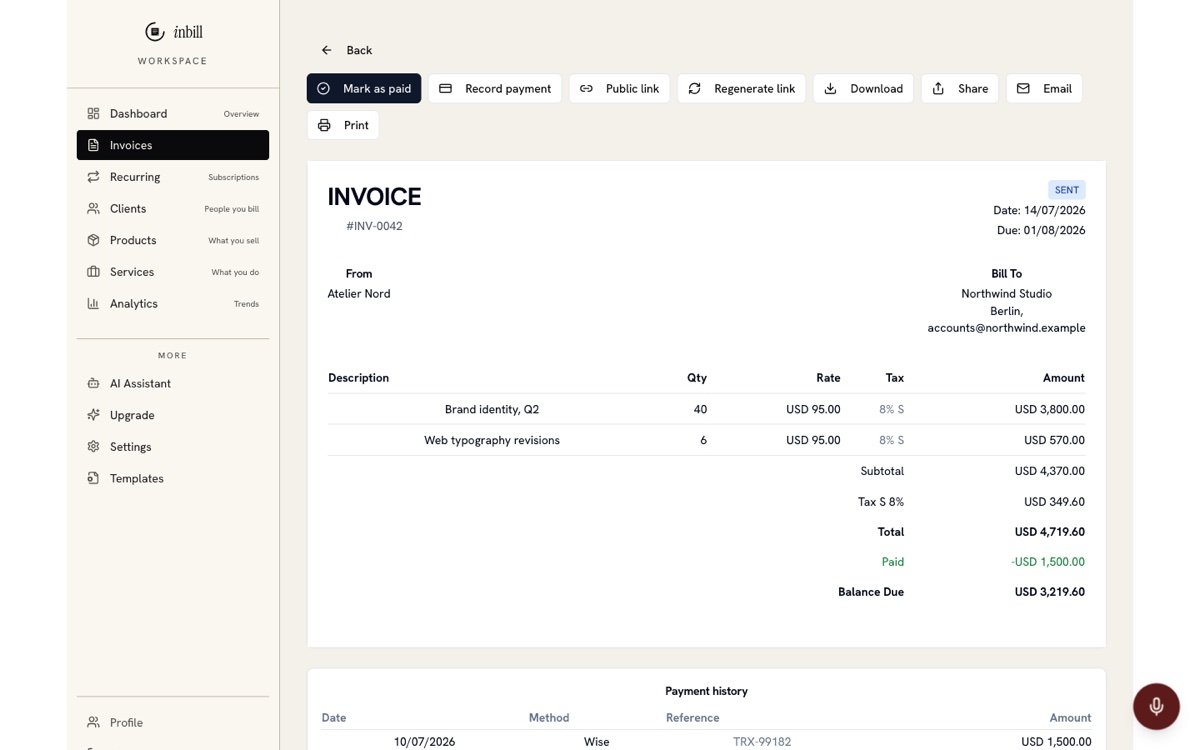
Send from the invoice's Send sheet — WhatsApp, email, link or PDF. Your client's page shows your payment details, "Pay with Wise" or "Pay with Payoneer" buttons when you've added those links, and an "I've paid" button. Reminders go out in three tones until the money arrives. Inbill records payments; it never processes them.
Inbill never touches the money: your client pays through your own Wise, Payoneer, bank or wallet, and you keep 100% of it.
- 01
Send on WhatsApp, email or link
The Send sheet prefills a WhatsApp message with the amount, due date and invoice link (to the client's WhatsApp number when you have saved one). Email and copy-link are one tap too; every channel marks the invoice as sent.
- 02
Add pay links once
In Settings → Payment methods add Wise (email, USD account/ACH/SWIFT details, pay link), Payoneer (email, "request a payment" link), bank transfer, JazzCash, Easypaisa or Raast. Pay links become buttons on the client's page; account details get copy buttons.
- 03
Confirm "I've paid"
When the client taps "I've paid" and says how, the invoice shows "Payment reported". Confirm it in one tap and the payment is recorded — nothing is marked paid until you do.
- 04
Let the reminder ladder chase
Friendly a few days before the due date, firm on the day, final once it is overdue. Turn reminders off per invoice; they pause while a reported payment waits for your confirmation.
- 05
Record partial payments
Amount, date, method, reference. The invoice flips to "partial" and the balance updates on the list, the PDF and the client's link.
05 · Templates
Pick how your invoices look
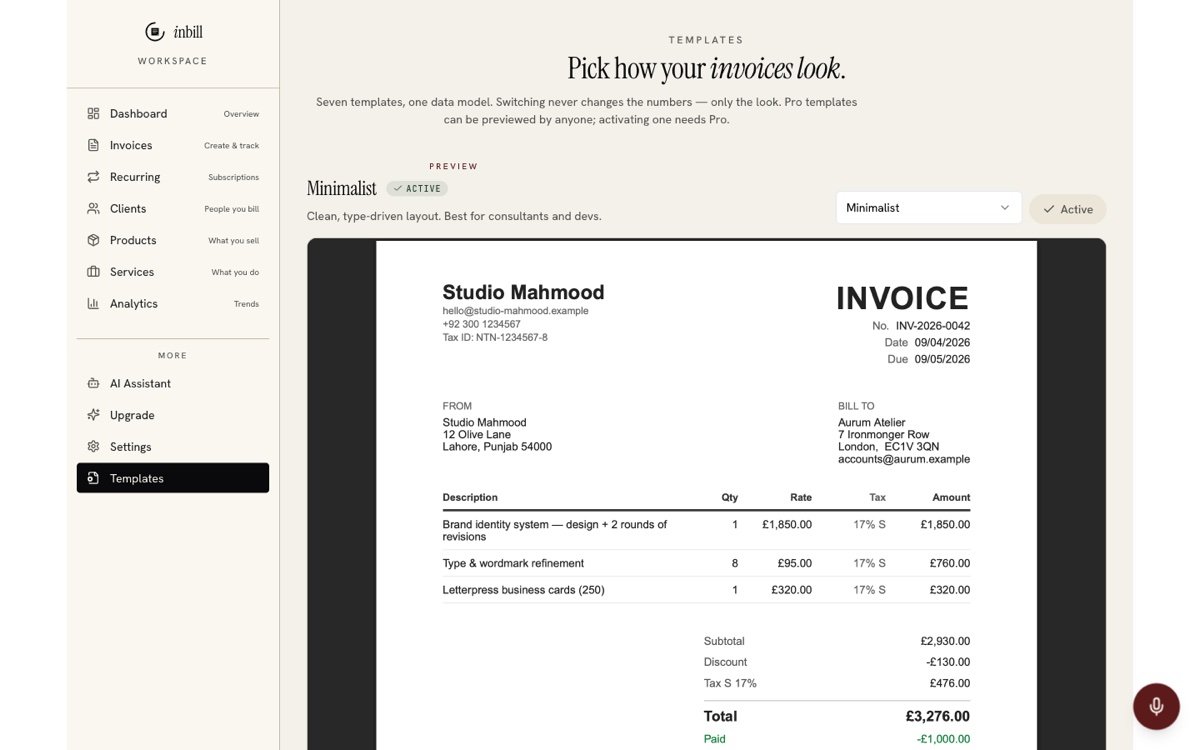
Open Templates in the sidebar, preview any of the seven designs against a sample invoice, and hit "Mark as active". Every new invoice uses it from then on — and keeps it, even on the client's public link. Four templates are free; POS receipt, clinic receipt, and boutique editorial are Pro.
- 01
Preview before committing
The hero preview renders the real PDF. Switch templates with the dropdown or the gallery cards.
- 02
Mark as active
New invoices snapshot the active template at create time, so old invoices never change look retroactively.
- 03
Try Pro templates free
Preview every Pro template, refer a friend for 30 days of Pro, or upgrade.
06 · Who owes you
See who owes you, client by client
Open a client to see their ledger: every invoice and payment with a running balance per currency, plus a badge for how they usually pay. "Send statement" drafts a WhatsApp-ready summary of everything open, and the dashboard's Collect now card lists overdue invoices, what's due this week and follow-ups due today.
- 01
Read the ledger
Invoices and payments in date order with a running balance. Balances in different currencies are kept apart, never added together.
- 02
Check the payment-behaviour badge
After two paid invoices the client shows their average days to pay and how often they paid late — private to you.
- 03
Send a statement
One message listing each open invoice, its link and the total outstanding — ready for WhatsApp or email.
- 04
Share the client page
One link per client that lists all their invoices and what is still open. Read-only, no login, replaceable any time.
- 05
Use Collect now
The dashboard card groups overdue invoices, invoices due within a week, and clients whose follow-up date has come — each with a one-tap WhatsApp nudge.
07 · Clients & catalog
Build the catalog once, bill forever
Clients, Products, and Services each have their own tab. Anything you add becomes a one-tap line item on future invoices, with rates and tax categories remembered. Products can track stock — quantities decrement automatically when an invoice is created.
- 01
Clients
Name, email, address, tax number. The AI assistant can extract all of it from a pasted email or signature block text.
- 02
Products with stock
Set "track stock" on physical goods and Inbill decrements quantity on every invoice.
- 03
Services with rates
Store your hourly or fixed rates once; invoices autofill them.
Quick answers
Asked constantly.
Do I need to install anything to use Inbill?
No. Inbill runs in any modern browser at inbill.net. The native Android app is in testing and opens on Google Play soon. Until then the web app works in any phone browser with the same account. An iPhone app is planned; the web app works in mobile Safari today.
Does the voice assistant understand Urdu?
Yes — Urdu, Hindi, Arabic, and English all work for voice input on web and Android. On the Android app, any language your phone's speech engine supports works. Transcripts appear as editable text before anything is sent.
Can my client pay directly from the invoice link?
Through your own payment rails, yes. The public link shows the live balance due, "Pay with Wise" / "Pay with Payoneer" buttons when you have added those pay links, and copyable bank, JazzCash, Easypaisa or Raast details. Inbill does not process the payment or take a cut; the client's "I've paid" report waits for your confirmation.
What happens when I hit the free limit?
After 10 invoices in a calendar month you can refer a friend for 30 free days of Pro, or upgrade to Pro at $5/month (or $49 once) for unlimited invoices. The free allowance resets on the 1st.
Three minutes to your first invoice.
Free for 10 invoices a month, every month. No card.
Start invoicingWorks in your browser today — Native Android app — public on Google Play soon